
There are dozens of AI image generators out there — but most won't cut it for real, client-ready work. This guide skips the hype and gets straight to the point: which tool to use, for which task, and which ones will just waste your time. It's written for graphic designers and creatives who want results they can actually deliver, not endless trial and error.
The Best AI Image Generators, Compared
ChatGPT (DALL·E / GPT Image) — Best Overall
The most complete option for professional work. It generates high-resolution images (up to 1792×1024 px) with no visible watermark, and it does something no other tool makes this easy: it can read your image, analyze its style and reproduce it on a different photo. The free plan gives you 2–3 images a day — plenty to explore and test. The Plus plan, from $20/month, jumps to 50 images every 3 hours. Since December 2025, ChatGPT Plus runs on GPT Image 1.5, which replaced DALL·E 3 with generation four times faster.
- Pros: high resolution, no watermark, accepts your own image as input, commercially safe, and a free tier to start.
- Cons: the free tier is limited in volume, it can refuse certain prompts, and it sometimes alters faces slightly.
Google Gemini — Free, but Use With Caution
Gemini is strong for text and analysis, but for professional image generation it has two real problems. First, its output resolution is lower than ChatGPT's. Second, even though the watermark isn't visible to the eye, every Gemini image carries SynthID — an invisible digital watermark embedded by Google DeepMind that flags the content as AI-generated. It's completely free and great for quickly exploring ideas, but it's not the right choice for commercial deliverables or brand work.
Midjourney — Best for Artistic Style
The king of aesthetics. Nothing beats it when you're after a strong, well-defined artistic look. The trade-offs: a steeper learning curve, it lives inside Discord, and since March 2023 there's no free plan — you pay from $10/month. Ideal for campaign key visuals, illustration and concept art. Think of it as a complement to ChatGPT, not a replacement.
Adobe Firefly — Best for Photoshop Editing
Firefly's pitch is unique: it lives inside Photoshop and Illustrator. It's not the best at generating images from scratch, but for non-destructive edits in an existing workflow it's incredibly powerful — extend backgrounds, remove objects, and fill areas with realistic context. It's trained on licensed content, so it's safe for commercial use.
Quick Comparison Table
| Tool | High resolution | No watermark | Accepts your image | Commercial use | Price |
|---|---|---|---|---|---|
| ChatGPT (DALL·E) | Yes | Yes | Yes | Yes | Free (limited) / $20 mo |
| Gemini | No | No (invisible SynthID) | Partial | No | Free |
| Midjourney | Yes | Yes | Partial | Yes | From $10 mo |
| Adobe Firefly | Yes | Yes | Yes | Yes | With Adobe CC |
The JSON Style-Transfer Trick (Copy a Style, Not the Image)
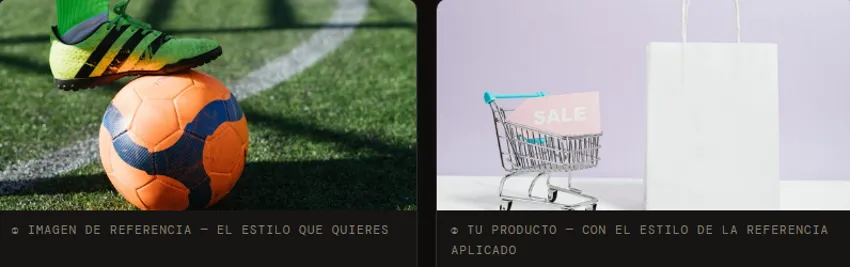
This is probably the most powerful technique you can use in your AI workflow right now. It lets you take the visual style of any image that inspires you — from Pinterest, an editorial, a campaign — and apply it to your own content without copying the original. It works because ChatGPT can analyze an image and describe its visual traits as structured JSON: color palette, lighting, temperature, composition, texture and mood. That "visual DNA" is then applied to your image, producing a transferred style rather than a copy.
Style Transfer for Portraits
- Find an image with a style you love — say, an editorial portrait on Pinterest.
- Upload that reference to ChatGPT and ask for the full JSON of the image, with its visual analysis.
- Copy the entire JSON.
- Open a new chat, say you want to create an image, upload your own photo, and paste the JSON at the end.
- ChatGPT applies the reference's style to your photo — the original person never shows up.
Style Transfer for Product Photography
- Find a product shot with the background, lighting and mood you want.
- Upload it to ChatGPT and ask for the JSON adapted to your specific product.
- Copy the resulting JSON.
- Open a new chat, upload your product photo, and paste the prompt.
- It adapts the style to your product's context — a lifesaver for brands without the budget for a full photo shoot.
Bonus: Blending Styles From Multiple References
Pick 2–3 references from different sources (one for color, one for composition, one for lighting), upload them in the same message and ask for a combined JSON. ChatGPT will try to merge the styles into a single structured prompt. Honest warning: this one is unpredictable — sometimes the results are stunning, sometimes a mess. That's part of the process: try, discard, repeat.
Which AI Tool Should You Use? (Cheat Sheet)
- Product photo or editorial portrait: ChatGPT with the JSON technique.
- Campaign key visual or concept art: Midjourney.
- Extending backgrounds or removing objects: Adobe Firefly inside Photoshop.
- Exploring quick ideas you won't publish: Gemini.
- Generating high volumes of images: ChatGPT Plus (50 images every 3 hours).
The Bottom Line
AI doesn't replace the designer's eye. What it does is remove the technical barrier between what you picture and what you can produce — but only if you pick the right tool. If you keep just one recommendation: start with free ChatGPT and the JSON technique. The 2–3 daily images on the free plan are enough to learn the ropes; when your workflow justifies it, the jump to Plus pays off. The tool executes; the designer directs. Aesthetic judgment, knowing your client, and brand consistency stay 100% yours.